Computing Basic Statistics
You can compute basic statistics, such as percentile and the maximum, mean, median, minimum, and standard deviation of the data that is available in any table. Computed results can be added as metadata to the current table or you can create a new derived table for the results.
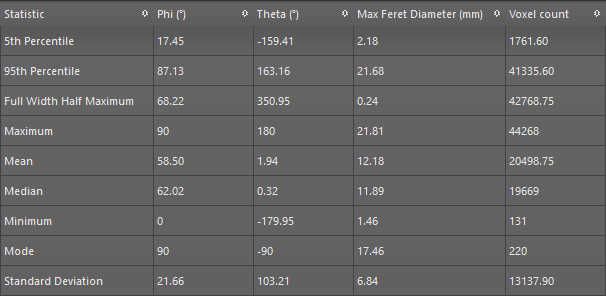
A selection of computed statistics are shown in the screen capture below.
Computed statistics
The following statistics are available in the Analyze and Classify Measurements dialog.
| Item | Description |
|---|---|
| 5th Percentile | Is the value below which 5% of the values within the data may be found. |
| 95th Percentile | Is the value below which 95% of the values within the data may be found. |
| Full Width Half Maximum | Is the width of the curve as measured between points on the Y-axis which are at the peak half maximum value. |
| Maximum | Is the maximum value within the selected data. |
| Mean | Is the mean value within the selected data. |
| Median | Is the median value within the selected data. |
| Minimum | Is the minimum value within the selected data. |
| Mode | Is the most commonly occurring value within the data. |
| Standard Deviation | Is the population standard deviation, which is a measure of the amount of variation or dispersion within the selected data.
Note Although both population and sample standard deviations measure variability, there are differences between these two computations. If you are calculating the population standard deviation, then you divide by 'n', which is the number of data values. If you are calculating the sample standard deviation, then you divide by 'n -1', which is one less than the number of data values. This means that the sample standard deviation will have greater variability than that of the population. |
| Sum | Is the integral of all values within the data. |
-
Select the required table.
Note Refer to the topic Importing Scalar Data for information about importing scalar data and Adding New Measurements for information about computing new measurements.
-
Click the Basic Statistics
 button.
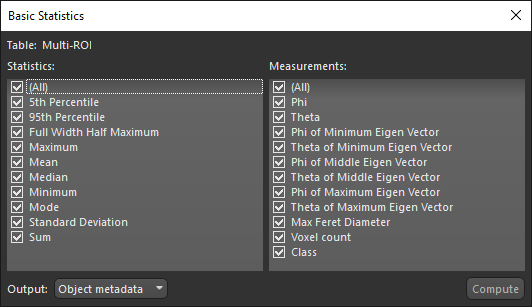
The Basic Statistics dialog, shown below, appears.
-
Select the statistics that you want to compute, as well as the measurements from which they will be computed.
-
Choose a destination for the computed statistics — 'Object metadata' or 'New derived table'.
-
Click Compute.
The computed statistics are added to the metadata of the selected table or to a new derived table.
